
Jai Club Deposit: How To Add Money By UPI, USDT And ARPay
A Jai Club deposit takes four steps: open Wallet, tap Deposit, choose a method and amount, then pay. You can add money by UPI from any UPI app such as PhonePe, Google Pay or Paytm, by USDT on the TRC20 or BEP20 network, or through ARPay.
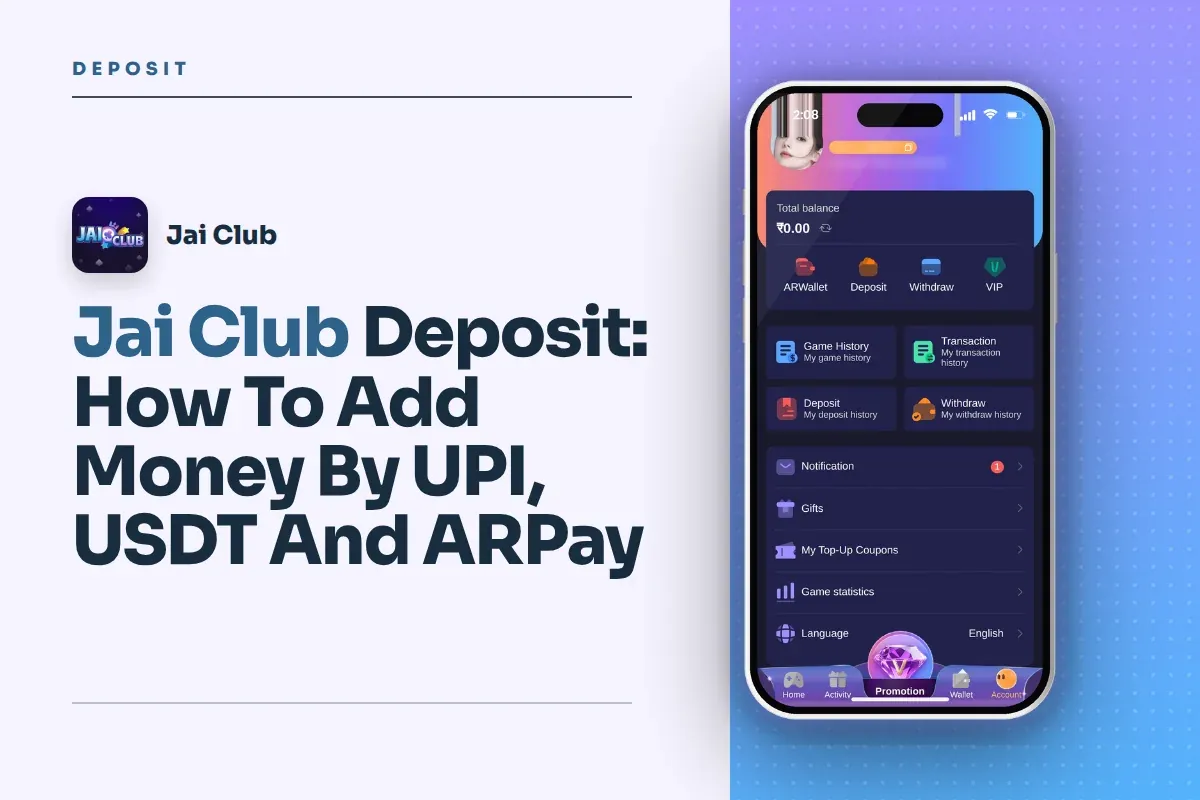
UPI deposits start at ₹100 and go up to ₹50,000 per order. The USDT tiles show a minimum of 10 USDT. Most failed deposits break one simple rule: the amount you send must match the order you created, down to the last rupee.
Below are the exact steps for each method, what to do when your balance does not update, how to read your deposit history, and the safety checks to make before you send any money.
- Minimum UPI Deposit
- ₹100
- Maximum UPI Deposit
- ₹50,000 per order
- Minimum USDT Deposit
- 10 USDT
- Payment Methods
- UPI, USDT, ARPay
- USDT Networks
- TRC20 and BEP20
- Invite Code
- 385987864126
Jump To Section
How To Deposit Money On Jai Club?
Every deposit starts from the Wallet icon in the bottom menu, after you log in. The same Deposit button also appears on the Account page and at the top of game screens such as Win Go and K3, so you can add money without leaving a game.
The system creates an order first and asks for payment second. That order has a fixed amount and a timer. Treat it like a bill: you pay exactly that bill, inside the time given, and the system matches your payment to it.
New players often open their UPI app, type a rounded amount and pay. That breaks the match and delays the credit. Follow the order below and you avoid most deposit problems before they start.
- Log in and tap the Wallet icon in the bottom menu.
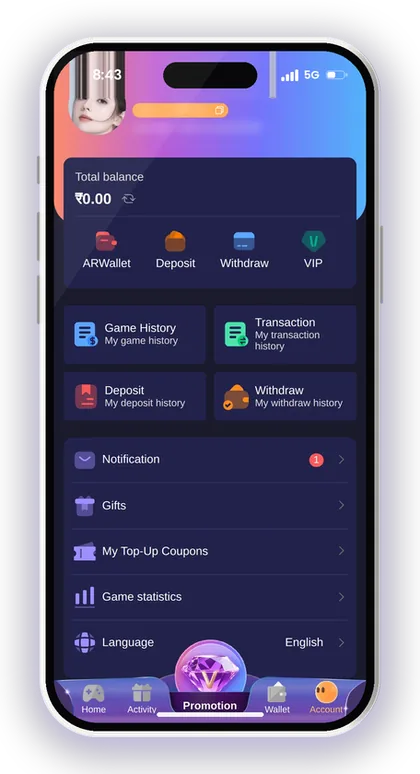
- Tap the Deposit button.
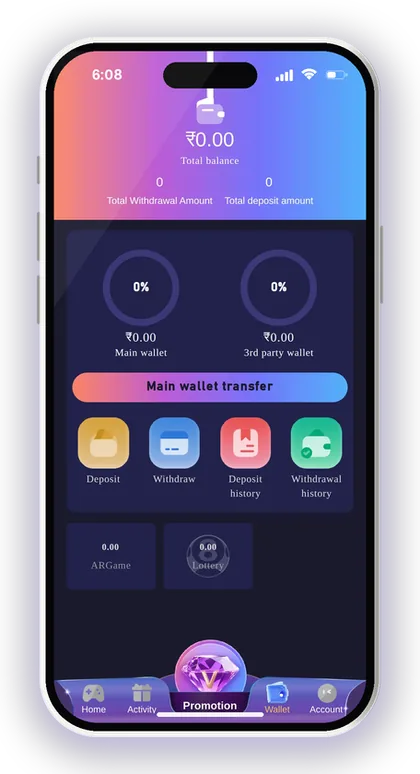
- Choose your payment method: UPI, USDT or ARPay.
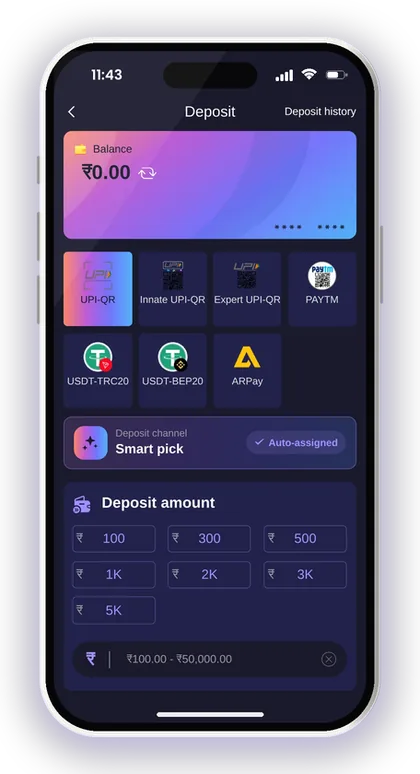
- Leave the channel on Smart pick, which is auto-assigned, or select another channel if shown.
- Enter the deposit amount or tap one of the preset amounts.
- Tap Deposit to create the order.
- Pay by scanning the QR code with your UPI app, or send USDT to the address shown.
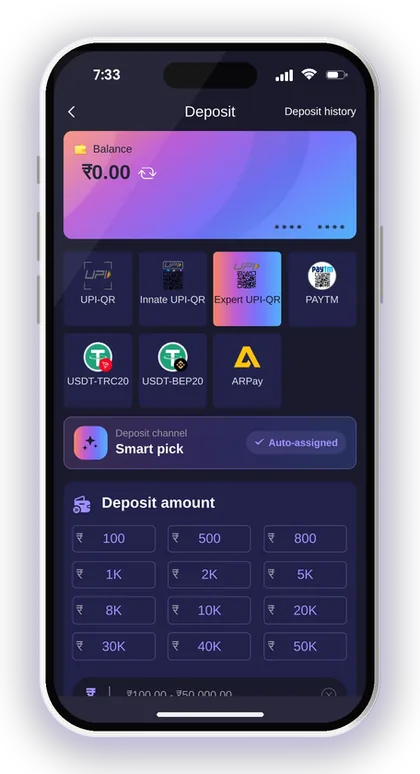
- Stay on the page until your balance updates, and do not cancel the order.
Deposit From The App Or The Mobile Website?
Both work the same way, because the Deposit page, payment methods and limits are the same in the Jai Club App and on the mobile website. The button to download the app sits at the top right corner of the homepage.
The real difference shows up while you pay. When your UPI app opens on top of the browser, some phones reload the tab and you lose the order screen. If you use the browser, do not close the tab or clear it from recent apps until your balance updates.
What Does The Deposit Timer Mean?
The timer shows how long your order stays open for payment. If the transfer time runs out, the order expires and you have to fill in the deposit form again to create a new one.
The common mistake is paying an old QR code after the timer ends, perhaps after stepping away to check your bank balance or ask someone for money. That payment no longer has an open order to match. Keep the money ready in your bank account before you start, and pay within the time shown.
Smart Tip: Take a screenshot of the order screen showing the amount and time before you pay, so you have proof if anything goes wrong.
Jai Club Deposit Methods And Limits
The Deposit page offers three ways to add money: UPI, USDT and ARPay. Several tiles on the page are all UPI, just sent through different channels, so the same ₹100 to ₹50,000 range applies to each of them.
USDT comes in two networks, TRC20 and BEP20, and both tiles show a minimum of 10 USDT. ARPay works through a separate AR Wallet that you must activate before your first use.
If you want more than ₹50,000 by UPI, you need to create more than one order. Each order is matched on its own, so keep a note of every amount and time.
| Method | Minimum | Maximum | How You Pay |
|---|---|---|---|
| UPI | ₹100 | ₹50,000 | Scan the QR code with any UPI app |
| USDT (TRC20) | 10 USDT | Check the tile | Send USDT on the TRC20 network |
| USDT (BEP20) | 10 USDT | Check the tile | Send USDT on the BEP20 network |
| ARPay | Check the ARPay tile | Check the ARPay tile | Pay from your activated AR Wallet |
UPI Vs USDT: Which Should You Use?
UPI is usually the easier option for players in India. Payment goes through PhonePe, Google Pay or Paytm in rupees, so you don't have to calculate any conversion rate or pick a network.
USDT suits players who already hold crypto and know how to send it. The trade-off is the risk of error: a wrong network or a wrong address can mean money you cannot get back. If you have never sent USDT before, do not learn on a large amount.
Why Does The Page Show Several UPI Options?
The extra UPI tiles are different payment channels, not different payment methods. Each one ends the same way: you scan a QR code or pay through your UPI app in rupees.
If one channel fails or the QR code does not load, go back and create a fresh order on another UPI tile rather than paying twice on the same order. Two payments against one order is the quickest way to end up in a long support case.
Paying A Jai Club Deposit By UPI
A UPI deposit means scanning a QR code on the Deposit page with your UPI app. The channel is set to Smart pick by default, which means the system assigns a working channel for you, so you rarely need to change it.
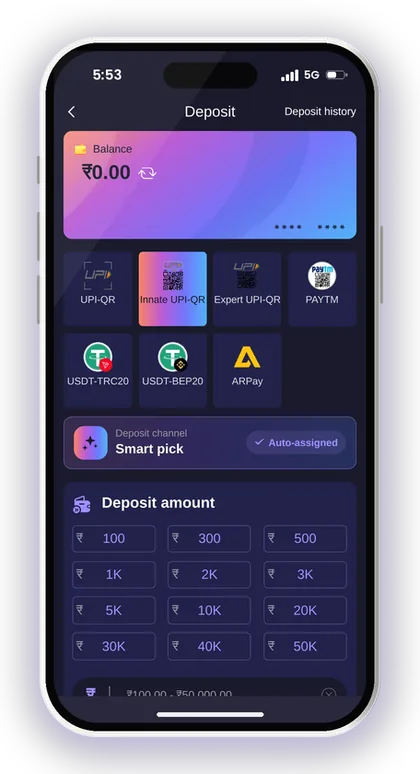
Some UPI tiles show preset amount buttons such as 10K, 20K, 30K, 40K and 50K. You can tap one or type your own figure, as long as it stays between ₹100 and ₹50,000.
Say you create a ₹500 order. Open PhonePe, Google Pay or Paytm, scan the code and check that the payment screen reads exactly ₹500 before you enter your UPI PIN. If the amount box can be edited, leave it as it is.
Make the payment from a bank account held in your own name. This keeps your transaction history tidy and helps you prove ownership if you ever need to contact support.
- The amount on your UPI screen equals the order amount exactly
- The order timer has not run out
- You are paying from your own bank account or UPI ID
- You have saved the UPI reference (UTR) number after paying
- You have not cancelled the order on the Deposit page
Smart Tip: Copy the UPI reference number from your payment app right after paying; it is the fastest proof support can use to trace your money.
Jai Club USDT Deposit On TRC20 And BEP20
USDT deposits use the USDT-TRC20 or USDT-BEP20 tile, and both show a minimum of 10 USDT. A transfer below that is not credited, so check the figure on the tile before you send.
After you create the order, a deposit screen shows the USDT address, the main network and a box to paste your transaction or hash ID. That address accepts only USDT and does not support any other cryptocurrency.
The screen also asks you to make sure your phone and network are safe, so information is not changed or leaked. Avoid making crypto transfers on public Wi-Fi or a shared phone.
- Tap Wallet, then Deposit, and choose USDT-TRC20 or USDT-BEP20.
- Select the amount of USDT and tap Deposit.
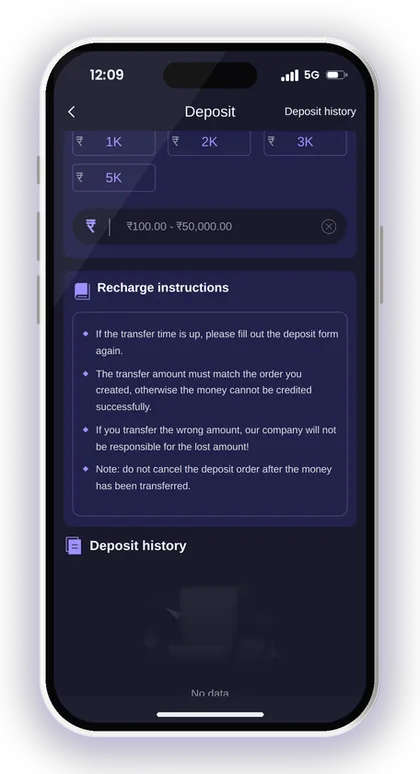
- Copy the USDT deposit address and note the main network shown.
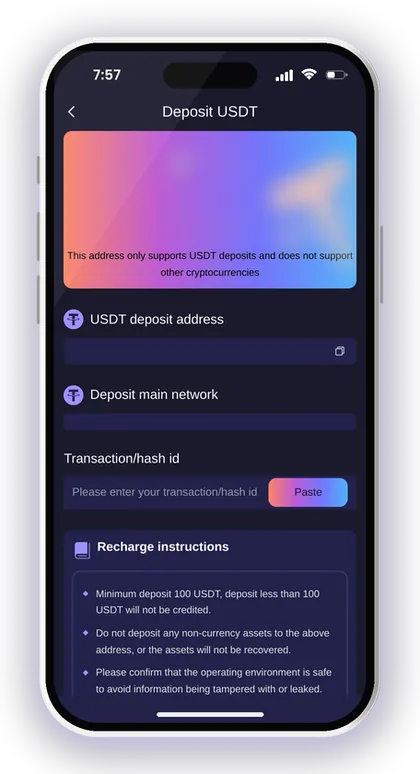
- Send USDT from your wallet on that same network.
- Copy the transaction hash from your wallet and paste it into the hash ID box.
- Tap Complete recharge.
TRC20 Or BEP20: Which Network To Pick?
Pick the network your own crypto wallet or exchange uses to send USDT, and make sure it matches the tile you chose. TRC20 runs on Tron and BEP20 runs on BNB Smart Chain; they are not the same.
The classic mistake is creating a TRC20 order and then sending on BEP20 because the exchange had it selected by default. The coins land on a network the address does not watch, and recovery may not be possible. Read the network line on both screens twice before you confirm.
What Happens If You Skip The Hash ID?
The hash ID links your blockchain transfer to your order, so always paste it before you tap Complete recharge. Without it, the team has to search for your transfer by amount and time, which takes longer.
Copy the hash from the transaction details in your wallet, not the address you sent to. Players mix these up often because both are long strings of letters and numbers. Also send only USDT to the address; other assets sent there will not be recovered.
Smart Tip: Make your first USDT deposit a small one, just above the 10 USDT minimum, so you can confirm the address and network work before sending more.
ARPay And AR Wallet Recharge
ARPay is a third-party payment service that uses ARB, a digital currency, through an AR Wallet. You must activate the AR Wallet first; the ARPay tile shows an activate button and a link to the AR Pay transaction rules.
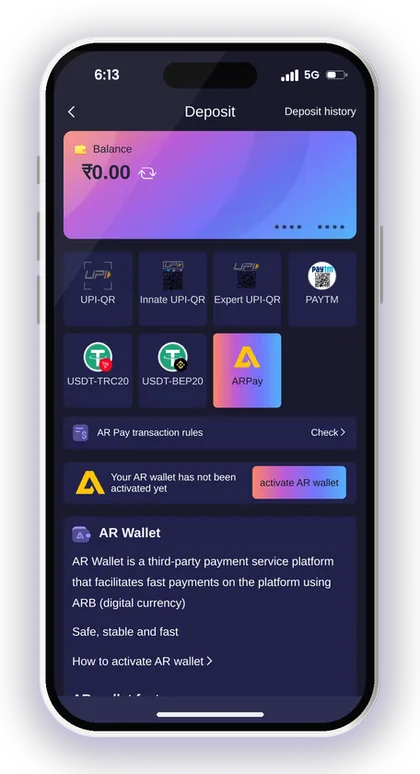
Once it is active, the platform says a recharge through AR Pay takes only about 5 seconds. When you later need rupees, you sell ARB through UPI inside the AR Wallet, and the platform mentions extra rewards for doing so.
The main benefit is fewer bank problems. Money moves between your game balance and the AR Wallet instead of hitting your bank every session, so bank limits matter less. The cost is one more app and one more balance to keep track of.
Before you use it, tap Check next to the transaction rules and read how selling ARB works. Activate the AR Wallet only from inside the app, never through a link someone sends you on WhatsApp or Telegram.
Smart Tip: If you only deposit once in a while, plain UPI is usually simpler; ARPay makes more sense when you add money often.
Before Your First Deposit: Account Setup And Jai Club Invite Code
The Deposit page opens only after you have a registered account, and signing up needs an invite code. While registering, type 385987864126 into the Invite Code field and add your +91 mobile number and a password.
Choose a password that is 8 characters long and combines uppercase letters, lowercase letters and digits. An OTP is sent to your phone during the Jai Club sign up form, so enter a number that can receive SMS.
Run through the checklist below before your first deposit. Each point prevents a problem that usually shows up later, at withdrawal time.
- Registered with invite code 385987864126
- Logged in with your own phone number
- UPI app or crypto wallet in your own name
- Enough money in your bank before creating the order
- A fixed spending limit decided for the month
Should Your Bank Name Match Your Account?
Yes, you should deposit from a bank or UPI account that carries your own name. The name you type while adding your first withdrawal account gets locked, and all withdrawal methods you add afterwards must carry that same name.
Players who deposit from a family member's UPI and then try to withdraw to their own bank create a mismatch that is hard to explain. Keep one name across deposits and withdrawals from day one and you avoid that confusion completely.
Can You Deposit Before Logging In?
No. You can't open Wallet or Deposit until you sign in with your password and either your phone number or your email.
If you forget your password, use Forgot password on the login screen; it resets through an OTP on your registered phone. Do not open a second account to get around a login problem. Event rules allow rewards only once per phone number, address, payment method and IP address, and repeat claims can be cancelled.
Jai Club Deposit Not Credited? Common Mistakes And Fixes
Most failed deposits come from four causes: a wrong amount, an expired timer, a cancelled order or the wrong USDT network. The recharge instructions on the Deposit page warn about the first three directly.
The platform states that if you transfer the wrong amount, it will not be responsible for the lost money. That is why matching the order amount matters more than anything else in this process.
The table shows each problem and the right first move. In every case, collect proof before contacting support: the order number, the amount, the time, and the UPI reference or USDT hash.
| Problem | Why It Happens | What To Do |
|---|---|---|
| Paid ₹499 on a ₹500 order | Amount does not match the order | Contact support with the UPI reference and a screenshot |
| Paid after the timer ended | Order had already expired | Contact support with proof; create a fresh order next time |
| Cancelled the order after paying | No open order left to match | Do not create a new payment; send proof to support |
| USDT sent on the wrong network | Address does not watch that network | Contact support at once; recovery may not be possible |
| Balance not updated yet | Payment still being matched | Check deposit history before paying again |
What To Do If Your Deposit Does Not Show
First, open Deposit history before you do anything else. If the order is still pending and your bank shows the money as debited, wait and do not pay a second time.
If it stays stuck, contact Jai Club customer care through the Customer Service option on the Account page. Share the order number, amount, time, and UPI reference or USDT hash. A clear screenshot of the bank debit saves a lot of messages back and forth.
Why You Should Never Cancel A Paid Order
Cancelling after payment removes the open order your money was meant to match, so the system has nothing to credit it against. The recharge instructions say it plainly: do not cancel the deposit order after the money has been transferred.
This usually happens when a player panics because the balance did not change in the first minute. Waiting costs you nothing, while a cancelled paid order can mean a long support case. Leave the order alone and check your history again after a short wait.
Smart Tip: Never pay the same order twice because the balance looks slow; check Deposit history first.
Where To Check Your Jai Club Recharge History
Your deposit records sit in two places: the Deposit history link on the Deposit page and My deposit history on the Account page. The Transaction section on the Account page lists every money movement in your account.
The Wallet page shows a total deposit amount figure next to the total withdrawal amount. It also splits your money into a main wallet and a 3rd party wallet, with a Main wallet transfer button.
That split matters more than new players expect. Some games run on a third-party wallet, so your balance can look short in one place while it sits in the other. Before you report a missing deposit, check both wallets and use Main wallet transfer if needed.
Experienced players compare total deposits with total withdrawals every week. Those two numbers give you an honest picture of how your play is really going, without guessing.
Smart Tip: Write down each deposit amount and date in your phone notes; it helps you match records and stick to your budget.
Deposit Offers Linked To Recharge
The Activity page lists several offers tied to deposits, including First Deposit, Cumulative 10Days Recharge Bonus and First Deposit Loss Rebate. There is also a Gifts box where you enter a redemption code, and gift codes usually come from your superior agent.
Read the rules of each offer before you deposit for it. You can compare the current Jai Club bonus offers in one place, and keep in mind that the platform can change or end any campaign without notice.
How The First Deposit Loss Rebate Works
This offer returns 35% of a new user's first-deposit losses as a bonus, with a cap of ₹150. The system pays it automatically to accounts that meet the conditions, under an event that started on 26 March 2026.
The cap is the part to notice. Losing more does not raise the rebate above ₹150, so it is a small cushion, not a reason to deposit more. Check the event rules for the exact timing condition before you count on it.
Do Deposit Offers Affect Withdrawals?
They can. The withdrawal steps say your total bet requirement must show 0 before you request money, so understand how any deposit or bonus adds to that figure before you play. The Jai Club withdrawal process covers this in detail.
The Lucky Roulette wheel is another example of conditions: it opens to members whose single or accumulated deposit reaches a set amount, and you must bind a bank card first. Know these rules before depositing for an offer, not after.
Safe Deposits, Scam Warnings And Your Playing Budget
Jai Club accepts only players above 18, and its own pages warn that gambling can be addictive. Every deposit is real money, and results in Win Go, K3, 5D, slots and casino games are random.
Customer service will never send members a link. If someone claiming to be support sends you one, do not click it, as it may lead to account theft or data loss. Always verify through the Jai Club official website.
Is There A Jai Club Hack For Free Recharge?
No. A Jai Club Hack does not exist, and no tool can give you free balance or predict the next result. Apps and Telegram channels that sell such tools are scams meant to grab your deposit or your login details.
Stay alert as well if someone promises a cheaper recharge but asks you to make a UPI payment to them first. The platform's own security notice warns users against revealing OTPs or paying unfamiliar contacts who pose as support staff. Add funds only through the Deposit page within your own account.
How To Set A Monthly Deposit Limit
Decide a monthly playing budget from money you can lose without touching rent, food or fees, then split it into small deposits. Say your limit is ₹2,000: four ₹500 deposits are easier to track than one large one.
Never deposit again just to win back a loss. That habit is how small sessions turn into big ones. If you reach your limit early, stop for the month, and use the total deposit figure on the Wallet page to keep yourself honest.
Smart Tip: If adding money starts to feel like a need rather than a choice, stop playing and talk to someone you trust.
Your Questions Answered
What is the minimum deposit on Jai Club?
The minimum UPI deposit is ₹100. The USDT-TRC20 and USDT-BEP20 tiles show a minimum of 10 USDT, and any amount below that is not credited.
What is the maximum UPI deposit per order?
Each UPI order can be up to ₹50,000. If you want to add more, create a separate order for each payment and keep a note of every amount and time.
Which UPI apps can I use to deposit?
Any UPI app works, including PhonePe, Google Pay or Paytm. Scan the QR code shown on the order screen, and before entering your PIN, confirm that the amount is exactly the same as the order amount.
I paid but my balance did not update. What should I do?
Open Deposit history first and do not pay again. If the order stays pending while your bank shows the money as debited, contact Customer Service from the Account page with the order number, amount, time and UPI reference.
What happens if I send the wrong amount?
The money may not be credited, because the transfer must match the order you created. The platform states it is not responsible for a wrong amount, so contact support with proof straight away and always pay the exact order amount.
Can I deposit without an invite code?
No. An account comes first, and signing up needs an invite code. Type 385987864126 into the Invite Code field while registering, then log in and go to the Deposit page.
Should I choose TRC20 or BEP20 for a USDT deposit?
Choose the network your own wallet or exchange uses to send USDT, and make sure it matches the tile you picked. Sending on the wrong network can mean losing the funds, so check the network line on the deposit screen carefully.
Will customer service ever send me a deposit link?
No. The platform says its customer service never sends links to members. If anyone claiming to be support sends one, do not click it, and only add money through the Deposit page inside your account.
More Pages For You
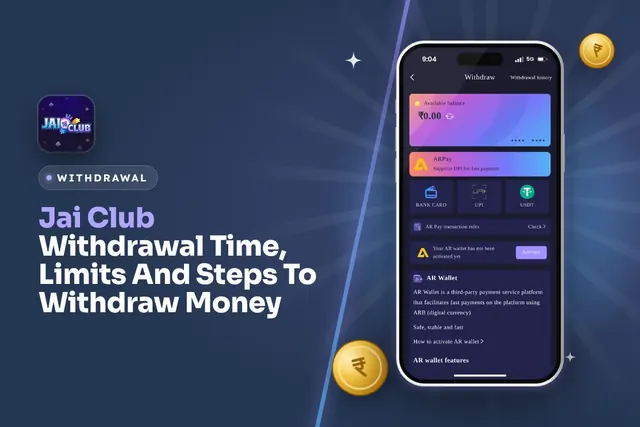
Jai Club withdrawal time and limits: UPI from ₹100, bank card from ₹110, USDT from ₹1,000, 3 withdrawals a day. Steps and fixes for pending requests.

Jai Club bonus offers explained: first deposit loss rebate, invite friends rewards, Super Jackpot, Lucky Roulette, gift codes, Point Mall and the rules.
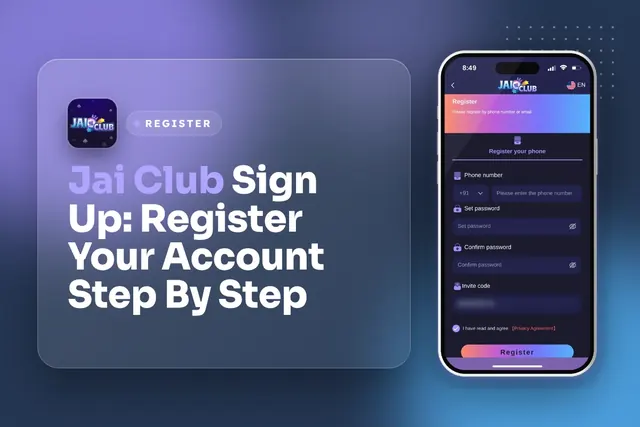
Jai Club sign up steps: phone number, OTP, strong password and invite code 385987864126. Fix common registration errors and keep your account safe.
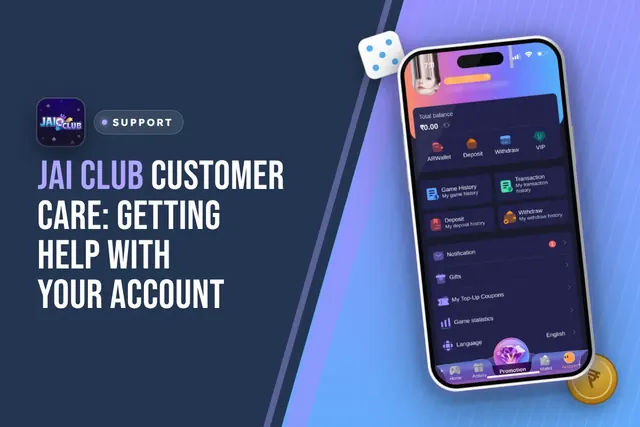
Jai Club customer care: where to find Customer Service in the app, what to send for deposit or withdrawal issues, login help and fake agent warnings.
Join Jai Club Today
Create your Jai Club account with the official link and the invite code applied.