
Jai Club Withdrawal Time, Limits And Steps To Withdraw Money
Jai Club withdrawal time depends on the method you choose. UPI requests are open from 00:00 to 23:59, while bank card and USDT requests run from 00:10 to 23:50. Every method allows 3 withdrawals per day.
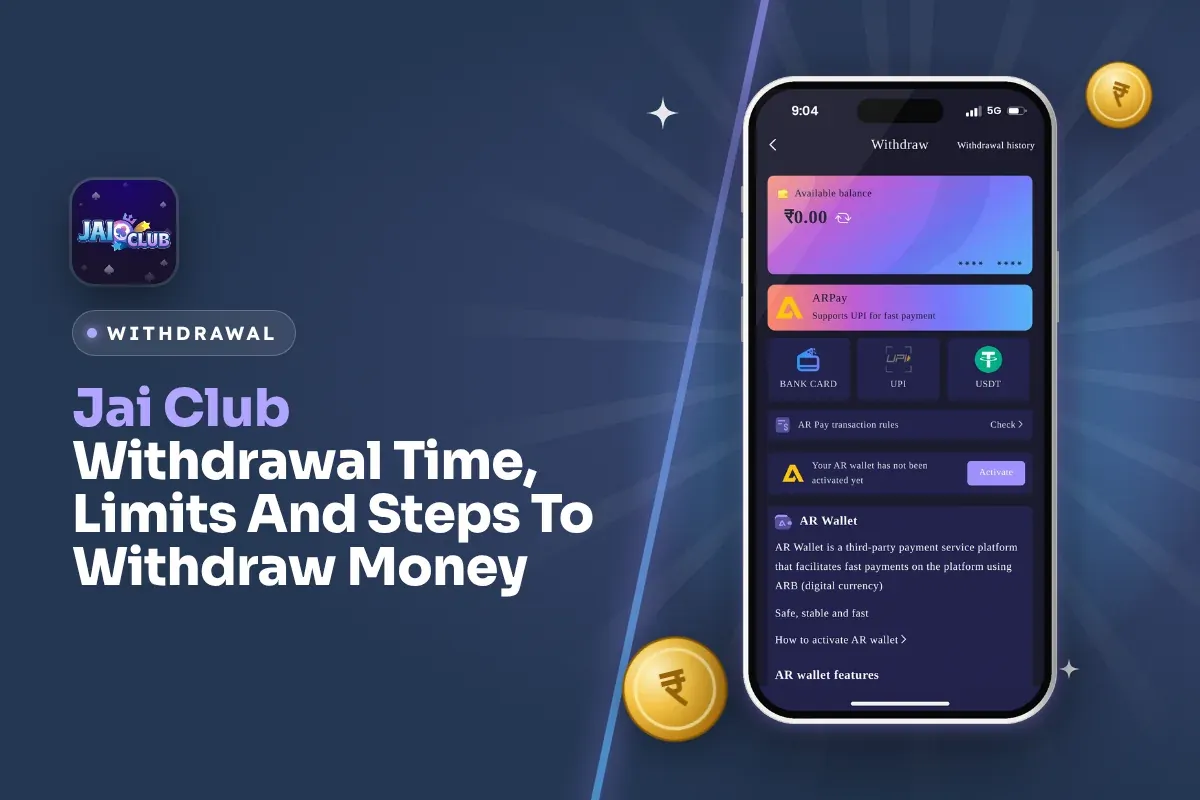
The minimum is ₹100 by UPI, ₹110 by bank card and ₹1,000 by USDT. UPI and bank card have a cap of ₹50,000 per request. How fast the money then reaches you depends on the method, your bank and whether your details are correct.
Most delays come from three things you control. Your remaining total bet is above 0, your name or IFSC code is wrong, or you sent the request outside withdraw hours. Each problem and its fix is covered further down.
- Withdrawal Methods
- UPI, Bank Card, USDT, ARPay
- UPI Minimum
- ₹100
- USDT Minimum
- ₹1,000
- Maximum Per Request
- ₹50,000 by UPI or bank
- Withdrawals Per Day
- 3
- Withdraw Hours
- 00:10–23:50 (UPI 00:00–23:59)
Jump To Section
Jai Club Withdrawal Time And Limits By Method
On Jai Club, each withdrawal method has its own hours, minimum and maximum. All three main methods allow 3 withdrawals per day. Compare them in the table below and pick your method before you type an amount.
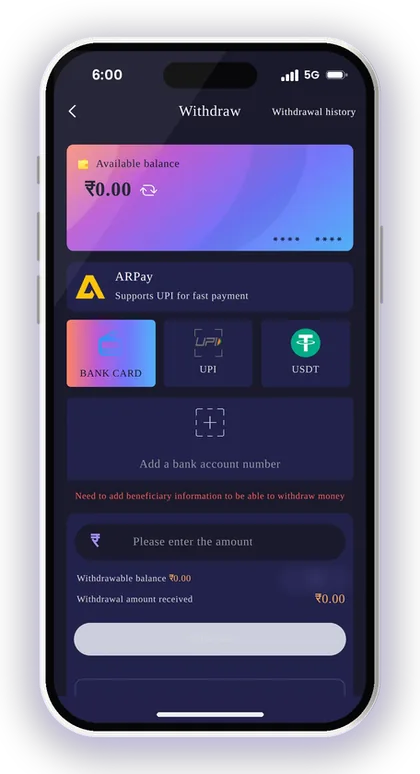
UPI has the longest hours and the lowest minimum. Bank card is almost the same. USDT is meant for bigger amounts, with a ₹1,000 minimum and a maximum of ₹1,000,000.
| Method | Minimum | Maximum | Withdraw Hours | Per Day |
|---|---|---|---|---|
| UPI | ₹100 | ₹50,000 | 00:00–23:59 | 3 |
| Bank Card | ₹110 | ₹50,000 | 00:10–23:50 | 3 |
| USDT | ₹1,000 | ₹1,000,000 | 00:10–23:50 | 3 |
What Time Can You Place A Withdrawal Request?
You can send a UPI withdrawal request at any time between 00:00 and 23:59, so it is open almost all day. Bank card and USDT requests work between 00:10 and 23:50. They are closed for the last ten minutes before midnight and the first ten minutes after it.
This matters more than it seems. Many players try to withdraw right at midnight. When the request does not go through, they think something is wrong with their account. If you play late, send the request before 23:50 or use UPI for that withdrawal.
How Long Does The Money Take To Reach You?
The withdraw screens do not show a fixed arrival time, so check your withdrawal history to see the status. The app says its deposits and withdrawals are fast. Still, the speed can change with your bank, the time of day and how busy the payment channel is.
USDT has one extra step you can plan for. After you withdraw, the transfer needs 3 confirmations on the blockchain main network before it reaches your wallet. Bank and UPI transfers also depend on your own bank, so a short delay may not be the app's fault.
Why Three Withdrawals A Day Changes Your Plan
You get only 3 withdrawal requests per day, so make each one count. If you withdraw ₹100 three times, you have used the whole day's limit. Any money you win later that day has to wait until tomorrow.
A better habit is to set a target before you play, such as getting your first deposit back or reaching ₹2,000 in winnings. Withdraw once you hit that target. You will still have one or two requests left if a transfer fails and you need to try again.
Smart Tip: If you want to withdraw more than ₹50,000, use USDT so you do not have to split the amount over several bank or UPI requests.
What You Need Before Your First Withdrawal
On apps like this, most failed withdrawals happen because of small mistakes. Check every point below before you tap Withdraw for the first time.
If you do not have an account yet, register first. The Invite Code field must be filled in, so enter 385987864126 when you sign up on the Jai Club sign up page. Use your real phone number, because OTPs for password resets go to that number.
Pay most attention to two points: the total bet rule and the name on your first withdrawal account. Players get stuck on these two more than anything else.
- An account you can log in to with your phone number or email and password
- Remaining total bet showing 0
- A bank account, UPI ID or USDT address saved in your own name
- An amount inside the range of the method you picked
- A request time inside that method's withdraw hours
- At least one of your 3 daily withdrawals still unused
What Does Total Bet Must Be 0 Mean?
You can only withdraw after the betting amount linked to your balance is fully played. On apps like this, deposits and many bonuses add an amount you must bet first. This number goes down as you play.
New players often deposit, play a few rounds and try to withdraw straight away. Then the request is blocked. Before you claim any offer, read its rules on the Jai Club bonus page, because a bonus may add to the amount you must bet.
Why Your First Withdrawal Name Gets Locked
The name attached to your first saved withdrawal account is permanent. Every other withdrawal method you link later must show an identical name, so the one you give at the outset will be used for your bank, UPI and USDT details too.
Type the name exactly as it is on your bank account, with the same spelling and the same word order. A common mistake is using a nickname or a family member's account. This can get your withdrawals rejected, and you cannot change the name yourself in the app later.
Smart Tip: Use the same name and mobile number for your account, deposits and withdrawal details so the records match.
How To Withdraw Money On Jai Club Step By Step
Once your withdrawal details are saved, a withdrawal takes only a few minutes. Open the app and sign in on the Jai Club login page with your phone number or email.
Follow the steps in this order, and do not close the app until you have sent the request.
You must type your login password to confirm a withdrawal, and this protects you. If someone picks up your unlocked phone, they still cannot withdraw your balance without the password. Do not save it in a notes app or share it with anyone, even someone who says they are from support.
- Tap the Wallet icon at the bottom of the screen.
- Tap the Withdraw button.
- Choose a method: ARPay, Bank Card, UPI or USDT.
- Check that your remaining total bet shows 0.
- Select your saved bank account, UPI ID or USDT address, or add one.
- Enter an amount that is within the range for that method.
- Enter your login password to confirm.
- Send the request and check its status in Withdrawal history.
Where To Find Your Withdrawal Status
Your request shows up under Withdrawal history on the withdraw screen. It also appears under My withdraw history on the Account page. Check that entry for the status, not only your bank SMS.
The Wallet page shows Total Withdrawal Amount next to Total deposit amount. Compare the two from time to time to see whether you are up or down overall. Many players never check this.
Should You Withdraw Everything At Once?
Not always. If you plan to keep playing, withdraw your winnings and leave a small playing budget in the main wallet. If you are done for the week, withdraw everything you can.
Keep in mind that any balance you leave behind must reach the minimum before you can withdraw it later. For example, ₹60 left in your wallet is below the ₹100 UPI minimum. You cannot withdraw it until your balance goes above the minimum.
Smart Tip: Can't remember your password? Choose Forgot password on the login screen, set a new one by verifying an OTP, and then continue with your withdrawal.
How To Add A Bank Account For Withdrawal
To withdraw by bank card, you must first save a bank account with the account holder's details. Open the Bank Card tab on the withdraw screen and tap the option to add a bank account number.
Compared with the UPI form, this one wants more information, and every entry has to be accurate. A single incorrect digit in the account number or IFSC code may lead to the request being rejected or the money going to a different account.
- Tap Wallet, then Withdraw, then the Bank Card tab.
- Tap the option to add a bank account number.
- Choose your bank from the list.
- Enter the full recipient's name exactly as it is on your bank account.
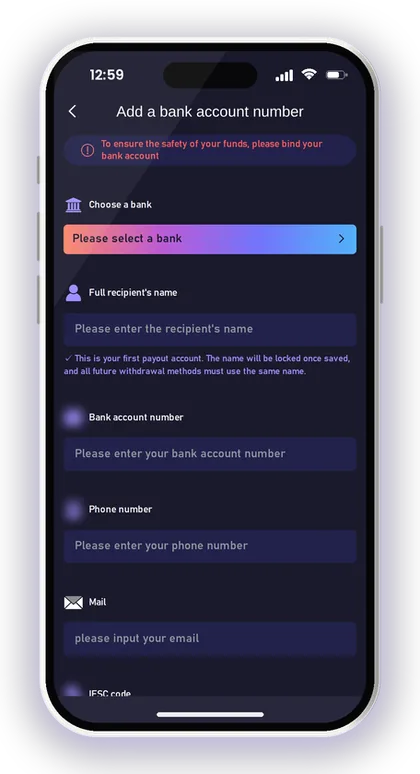
- Enter your bank account number.
- Enter your phone number and email.
- Enter your branch's IFSC code.
- Tap Save.
How To Avoid IFSC And Account Number Mistakes
Copy your IFSC code and account number from your passbook, cheque book or banking app. Do not type them from memory. Each branch has its own IFSC code, so make sure you use the code for your branch and not just any code for your bank.
Go through each field one more time before tapping Save. A warning on the withdraw page says the company takes no responsibility for losses arising from incorrect bank details, so checking them is your job.
What If You Saved The Wrong Bank Details?
Contact customer service before you send any withdrawal. The Bank Card screen says to contact customer service if your saved bank details are wrong.
Do not send a withdrawal and hope the money comes back. Get the details fixed first, then withdraw. Keep a photo or screenshot of your correct bank details ready so support can check them quickly.
How To Bind UPI For A Jai Club Withdrawal
For most players, UPI is the easiest way to withdraw. The form is short and uses the same UPI ID you already have in PhonePe, Google Pay or Paytm.
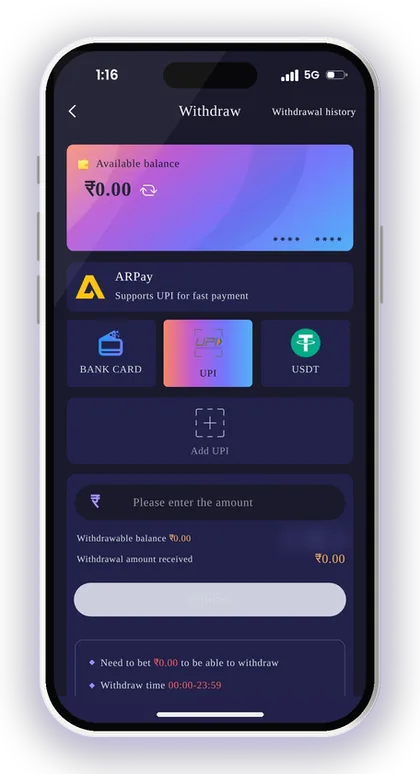
To start, open the UPI tab on the withdraw screen and tap Add UPI. Enter your real mobile number, because the app asks for it to keep your account safe.
- Tap Wallet, then Withdraw, then the UPI tab.
- Tap Add UPI.
- Enter your UPI Name.
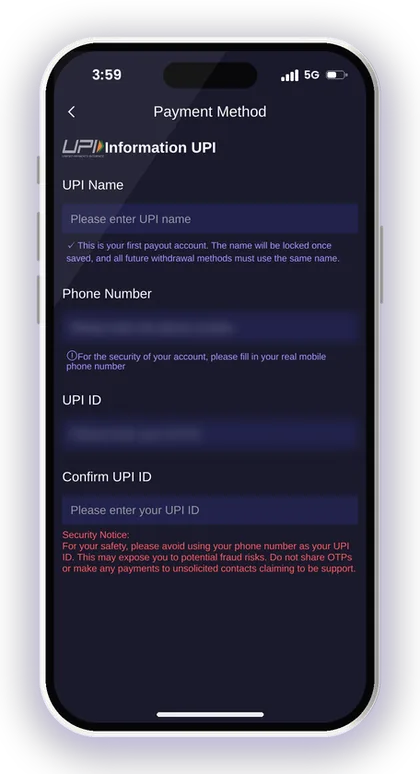
- Enter your real mobile phone number.
- Enter your UPI ID.
- Enter the same UPI ID again in Confirm UPI ID.
- Tap Save.
Should You Use Your Phone Number As Your UPI ID?
No. A security alert inside the app tells users not to make their phone number their UPI ID, since that can expose them to fraud. If a UPI ID is made from a phone number, anyone who sees it can also find out your mobile number.
Most UPI apps let you create a second UPI ID that uses your name or a word you choose. Make one in your UPI app first, then add that ID here. It takes two minutes and makes it harder for scam callers to reach you.
Why The Confirm UPI ID Field Exists
It catches typing mistakes. If one letter in a UPI ID is wrong, the money can go to someone else's account or fail completely. That is why the app asks you to type the ID twice.
Copy the ID from the profile screen of your UPI app and paste it in both fields. Also check that the bank account linked to this UPI ID is in the same name you locked on your first withdrawal account.
Smart Tip: Never share an OTP with anyone who calls you about a UPI withdrawal; the app's security notice warns about these calls.
USDT Withdrawal: Address, Network And Confirmations
USDT is useful if you already have a crypto wallet and want to withdraw more than the ₹50,000 limit on bank and UPI. You must add a USDT address before your first USDT withdrawal.
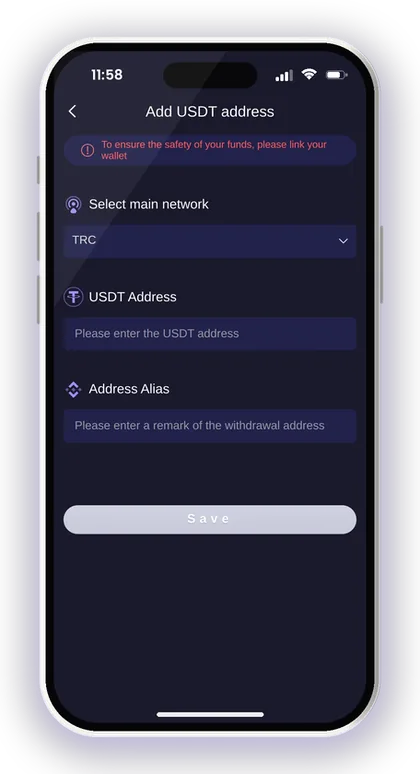
On the USDT tab, tap Add address and select the main network. TRC is the option the app shows. Then paste your USDT address, give it a short name such as My TRC wallet and tap Save.
When you withdraw, you pick the USDT amount and confirm the request. The transfer then needs 3 confirmations on the blockchain main network before it shows in your wallet.
What Happens If You Pick The Wrong Network?
Crypto sent on the wrong network is often lost for good, so avoid this mistake above all. If you select TRC in the app, the address you receive on must also be a TRC address.
Check this in your crypto wallet before you save the address. Open the USDT receive screen and make sure it says TRC20 or Tron. If your wallet only shows a BEP20 address, do not paste it into a TRC field.
Is USDT Faster Than UPI?
Not always. With USDT you do not have to deal with bank limits or bank holidays. You still have to wait for blockchain confirmations, though, and then sell the USDT to get rupees.
For everyday amounts, UPI is usually easier because the money goes straight to your bank. USDT is a better fit when the amount is large, or when your bank often blocks or questions transfers from gaming apps.
Smart Tip: Make your first USDT withdrawal a small one, close to the ₹1,000 minimum, to test your address before you move a large amount.
Bank Card Vs UPI Vs USDT Vs ARPay: Which Should You Use?
No single method is best for everyone. The right choice depends on how much you are withdrawing, what time it is and how well you know crypto. The table shows how the four methods compare.
Use the same kind of method to add and withdraw money. If you add money by UPI on the Jai Club deposit page screen, withdraw to a UPI ID in the same name. This makes your records easy to match if you ever have to contact support.
| Method | Best For | Watch Out For |
|---|---|---|
| UPI | Everyday amounts and late-night requests | Phone-number UPI IDs, name mismatch |
| Bank Card | Players who prefer direct bank transfers | IFSC and account number errors |
| USDT | Amounts above ₹50,000 | Wrong network, 3 confirmations |
| ARPay | Players who already use AR Wallet | AR Wallet must be activated first |
How ARPay Withdrawals Work
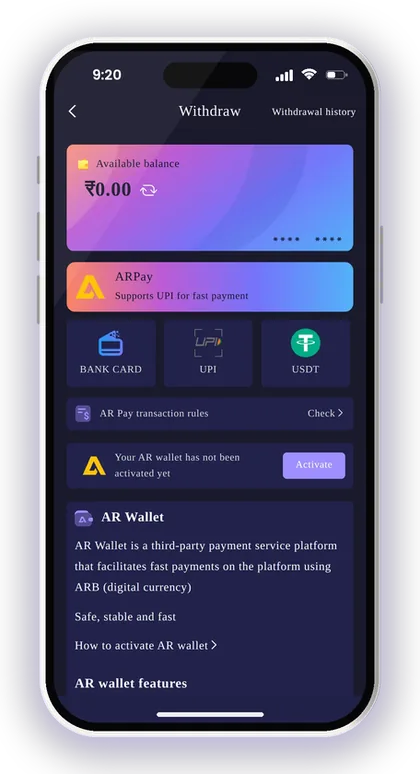
ARPay sends your balance to AR Wallet, a separate payment app that uses a digital currency called ARB. You must activate your AR Wallet before you can use the ARPay tab.
When you need rupees, you sell ARB through UPI inside AR Wallet. The app says you can also get extra rewards when you do this. Read the AR Pay transaction rules on the tab before your first try, because this method has one more step than a direct UPI withdrawal.
Does ARPay Help With Bank Limits?
That is the main reason to use it. The app says that keeping your money in AR Wallet means fewer problems with bank transactions while you play. You only sell to UPI when you actually need the money.
The downside is that your money stays in a separate wallet instead of your bank account. If you want simple, direct transfers that are easy to track, UPI or bank card is the better choice.
Jai Club Withdrawal Pending Or Rejected: What To Do
A Jai Club withdrawal pending in your history for a while is not always a problem. Bank-side checks and busy times can slow down the status update, even when the transfer is already on its way.
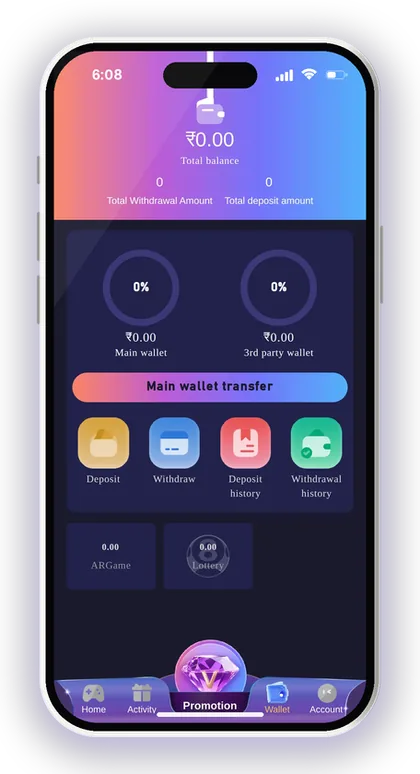
First, open the entry in Withdrawal history and note the amount, time and method. Then check your bank or UPI app, because sometimes the money arrives before the status changes.
What To Do If The Money Does Not Arrive
Wait a reasonable time, then contact customer service with your request details. Open Customer Service from the Account page, or see the Jai Club customer care page for help.
Send a Jai Club withdrawal screenshot from your history that shows the amount, time and status. Add your bank statement if it helps. Clear proof gets you an answer faster than a message that only says money not received.
Why A Withdrawal Request Gets Blocked
The usual reasons are a total bet that is not yet 0, an amount outside the method's range, a request sent outside withdraw hours, or all 3 daily withdrawals already used.
Wrong withdrawal details are the other big cause. If your name, account number, IFSC code or UPI ID is wrong, ask customer service to fix it first. Sending the same request again with the same wrong details only uses up another of your daily withdrawals.
Smart Tip: After a failed request, check your Main wallet balance on the Wallet page to see if the money is back before you try again.
Withdrawal Safety: Fake Links, OTPs And Jai Club Hack Scams
The app warns that its customer service will never send links to members. If someone who says they are Jaiclub support sends you a link, do not open it, because it could put your account and data at risk. Always check through the Jai Club official website.
There is no Jai Club Hack that allows higher withdrawals, bypasses the total bet rule or reveals results beforehand. Apps and groups that sell such tools are scams, and they take your money or your login details. Game results are random.
Real-money play involves genuine risk, and only players who are 18 years or older can use the app. Deposit just what you can afford to lose. Rules on real-money gaming vary between Indian states, so look up what applies where you live.
- Never share your login password or any OTP.
- Your UPI ID should never be the same as your mobile number.
- Check your bank and UPI details before you tap Save.
- Only use the Jai Club App or the official website, never links sent in chats.
Smart Tip: Set a weekly playing budget and withdraw anything above it, so your winnings go back to your bank and not into more bets.
Your Questions Answered
What is the Jai Club withdrawal time?
You can send UPI withdrawal requests from 00:00 to 23:59. Bank card and USDT requests work from 00:10 to 23:50. The app does not show a fixed arrival time, so check Withdrawal history for the status.
What is the minimum withdrawal on Jai Club?
The minimum is ₹100 by UPI, ₹110 by bank card and ₹1,000 by USDT. The maximum is ₹50,000 per request for UPI and bank card, and ₹1,000,000 for USDT.
What is the daily limit on withdrawal requests?
Each method allows 3 withdrawals per day. Plan your amounts so you do not use up all three on small requests.
My balance shows funds, so why is my withdrawal not going through?
Your remaining total bet must show 0 before you can withdraw. Also check that the amount is within the method's range, that you are within withdraw hours, and that you have not already used your 3 daily withdrawals.
Is it possible to edit the account holder name linked to my withdrawals?
After you save your first withdrawal account, its name is locked. Every withdrawal method added later must use that same name. If it has been entered wrongly, get in touch with customer service before you make a withdrawal.
How long does a USDT withdrawal take?
After you withdraw, the transfer needs 3 confirmations on the blockchain main network before it reaches your wallet. Make sure your address is on the TRC network you selected in the app.
Is an invite code mandatory at sign-up before I can cash out?
Yes. You can't complete registration without filling in the Invite Code field. Type 385987864126 there while signing up.
Is there a Jai Club Hack to withdraw faster or win more?
No. Any app or group that says it can speed up withdrawals or predict results is a scam. Game results are random, and customer service will never send you links.
More Pages For You
Jai Club deposit steps for UPI, USDT and ARPay, with the ₹100 to ₹50,000 UPI limits, USDT network tips and fixes when your recharge does not show.

Jai Club customer care: where to find Customer Service in the app, what to send for deposit or withdrawal issues, login help and fake agent warnings.
Jai Club Login with your +91 mobile number or email, reset a forgotten password via OTP, fix common sign-in issues and avoid fake links.

Jai Club bonus offers explained: first deposit loss rebate, invite friends rewards, Super Jackpot, Lucky Roulette, gift codes, Point Mall and the rules.
Join Jai Club Today
Create your Jai Club account with the official link and the invite code applied.